IdiomIQ builds tools and extensions for WordPress and Moodle, helping educators and language schools get more from their platforms. We also offer consultancy for organisations that need tailored solutions built around their specific requirements.
ADAPTIVE LEVEL TEST
Turn Website Visitors into Qualified Leads
Adaptive Level Test is a free WordPress plugin for educators and language schools. Visitors get an accurate CEFR placement. You get a lead with their level already attached.
Most English tutors and schools collect leads the same way — name, email, maybe a message. You get enquiries from people you know almost nothing about.
Are they A1 or C1? Have they studied before? Are they looking for conversation classes or exam prep?
You won't find out until you've spent 20 minutes on a discovery call. If they show up at all.
Meanwhile, visitors who aren't sure of their level don't even enquire. They don't know if your courses are right for them. So they leave.
WHAT
Give them something useful. Get something valuable back.
1Your site. Your brand. Your data. The test runs entirely on WordPress — no redirects, no third-party platforms, no visitors you send away and never see again.
2The algorithm recalibrates throughout the test, so every result is an accurate CEFR placement you can confidently follow up on.
3The moment they submit, you have a lead with context. Their email and English level — ready before you've written a single word of follow-up.
HOW IT WORKS
Up and running in minutes
Add it to any page
Paste a shortcode where you want the test to appear. Works with any WordPress theme.
Visitors take the test
The adaptive algorithm adjusts difficulty in real time. No account needed. No app to download. That's it
You receive a qualified lead
The moment they start the test, you have their email. When they finish, their CEFR level joins it in your WordPress dashboard — and you get an email notification straight away.
DEMO
Try It Out
See What Your Students Experience
Enter your email and take the test. The algorithm will adapt to your answers and return your own CEFR result at the end. What you experience here is exactly what your students see on your site.
Unlike static tests, the algorithm selects the next question based on how the student is performing. They reach an accurate A2–C2 placement faster, without sitting through questions that are too easy or too hard.
Leads Built In
Students share their email to unlock their result
The test itself is the incentive. Learners want to know their level, so they're happy to share their email to get it. No pop-ups, no discount code required — the value exchange is built into the experience.
Ready From Day One
150 sample questions included, covering A2 to C2
Install the plugin and you're ready to go. The default question bank includes 150 multiple-choice grammar questions across all five CEFR levels. Add your own, or import from CSV to build a fully custom set.
Instant Results Email
Every student gets their CEFR level by email immediately
The moment a test is submitted, the student receives an email with their result. Customise the subject, body, and footer. HTML is supported, and a simple placeholder inserts their CEFR level anywhere in the message.
New Lead Alerts
Get notified every time a student finishes the test
Receive an email for every completed test. Add multiple recipients and customise the subject and body. Each notification includes the student's email address, their CEFR result, and the question bank they used.
Match Your Brand
One colour setting updates buttons and highlights everywhere
Set a primary colour and it applies across the whole test — buttons, progress bar, and highlights update at once. A quick win for brand consistency that takes seconds and requires no CSS knowledge.
Works Anywhere
Paste one shortcode to embed the test instantly
Add [ adaptive_level_test ] to any page, post, or widget area. It works with any WordPress theme or page builder. Assets only load on pages where the shortcode is placed, so there's no impact on site speed elsewhere.
Run Different Tests
Create separate banks for different pages or audiences
Set up to three independent question banks and assign each to a different page using the shortcode's bank parameter. Useful for testing different student groups, course levels, or multiple sites from one install.
Full Question Control
Add, edit, and delete questions from the admin panel
Manage your question library directly from the WordPress dashboard. Update question text, answer options, correct answers, and difficulty level at any time. Changes take effect immediately — no cache clearing or rebuild needed.
Bulk Question Upload
Import your entire question library from a CSV file
Build your question set in a spreadsheet and upload it in one go. Export any bank for backup or migration. The format is straightforward — question, options, answer, CEFR level — so no technical setup is required.
Set the Test Length
Choose how many question batches the algorithm serves
Control the maximum number of question batches before a result is returned. More batches mean a longer test and greater accuracy. Fewer batches mean a quicker experience. Adjust it to suit your audience and context.
Honest About Accuracy
Show a margin of error alongside the student's result
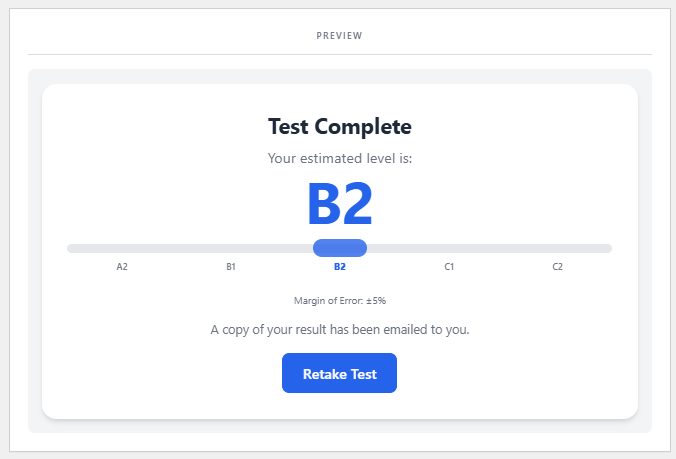
Display a confidence range on the results scale so students understand the test's precision. Configure the percentage and label text yourself. Useful wherever you want to set realistic expectations about placement accuracy.
Edit Every Word
Change every line on the test start screen
Customise the title, subtitle, body text, email placeholder, and start button label to match your brand voice. Everything on the start screen is editable from the admin settings — no code or theme changes needed.
Customise the Results
Edit every word on the results completion screen
Change the title, subheading, and body text shown after the test finishes. Use it to set expectations, suggest next steps, or reinforce your brand. All changes apply immediately without editing any template files.
Show Their Progress
A visual progress bar fills as questions are answered
Toggle the progress bar on or off with a single setting. When enabled, it advances with each answer, giving students a sense of momentum. This small visual cue can meaningfully reduce drop-off mid-test.
Accessible by Default
A dyslexia-friendly font option built into every test
Students can switch to a dyslexia-friendly font at any point during the test without leaving the page. The toggle button labels are customisable. It's enabled by default and requires no setup or extra plugins.
Beyond the Level
Strong or Borderline results, not just the broad level
A B2 result isn't one-size-fits-all. The algorithm classifies each result as Strong, Mid, or Borderline within its level — giving you a more precise picture of where the learner actually sits on the scale.
Marketing Opt-In Built In
Add a follow-up consent checkbox for GDPR compliance
Enable an optional marketing consent checkbox on the start screen. Students can tick it to receive information about your courses. It's entirely optional — ticking or skipping it doesn't affect access to the test.
Every Result Stored
A full log of every test completed on your site
Each submission is recorded with the student's email, CEFR level, sub-level, date, and question bank. Filter by bank or email, sort by any column, and track patterns across your leads over time.
Export Your Leads
Download all attempt logs as a CSV file instantly
Pull your full results database into a spreadsheet with one click. Filter by question bank before exporting to segment your data. Use it in your CRM, email platform, or reporting workflow without any manual copying.
Manage Your Records
Search, filter, delete, and manage individual attempt logs
Remove individual entries, bulk delete selected records, or clear everything older than a set number of days. Filter the log view by student email or question bank to find exactly what you need quickly.
Automatic Housekeeping
Old logs removed automatically on a schedule you choose
Set a retention period in days and the plugin clears outdated logs every 24 hours. Set it to zero to keep records indefinitely. Your database stays tidy without any manual maintenance on your part.
Block Repeated Submissions
Limit how often the same IP can start the test
Set a maximum number of test starts per IP address per hour to prevent automated or repeated abuse. Raise the limit for schools or co-working spaces where multiple students share the same network connection.
Leave No Trace
Delete all plugin data when you remove the plugin
Enable the option in settings and every database table, log, and configuration value is permanently removed when the plugin is deleted. Disabled by default so you never lose data accidentally during updates or temporary deactivations.
Install the free plugin and start capturing level-qualified leads today.
Upgrade to Pro when you want deeper reporting and a more feature-rich experience.
Free plan has no time limit.
Pro comes with a 14-day money-back guarantee.
PRO VERSION
Advanced Features
PRO FEATURE
Printable Student Reports
Detailed Attempt Summary
A full report for every attempt, ready to print
Open a detailed report for any attempt directly from the logs table. It includes the student’s result, CEFR scale, accuracy breakdown, score map, and full answer detail. Print it or save it as a PDF in one click.
Click Image to Open
Statistical Depth Included
Ability score, standard error, and confidence in every report
Each report surfaces the IRT ability score (θ), standard error in logits, and a derived confidence interval. Useful for understanding how reliable a result is and for communicating precision to students or academic partners.
Level by Level Accuracy
See how each student performed at every CEFR level
Each report includes gauge charts showing accuracy at A2, B1, B2, C1, and C2 separately. You see not just the final result, but exactly where the student was confident and precisely where they struggled.
Click Image to Open
Visualise Every Answer
A dot plot charts every question answered in the session
The score map plots each question on a CEFR difficulty axis — green for correct, red for incorrect. See the full trajectory of the test at a glance: which levels were attempted and where performance shifted.
Question by Question
See exactly what each student answered for every question
Every question the student saw is listed — with the question text, all options, their chosen answer, and the correct answer highlighted. Grouped by batch so you can follow the full session chronologically from start to finish.
Click Image to Open
PRO FEATURE
Full Visual Customisation
Complete Control
Style every element of the test to match your site
Pro gives you independent control over every visual element and every line of text across all three stages — start screen, questions, and results. Change colours, sizes, and wording. Remove anything that doesn’t fit. No CSS. No developer required
Click Image to Open
Before the Test
Start Screen Styling
Set the tone before the first question is asked
Edit or remove the title, subtitle, body text, and button label to say exactly what you want. Then style each element independently — colour, font size, weight, input border, and test box background, corner radius, and shadow.
Click Image to Open
During the Test
Question Screen Styling
Keep every question on-brand from start to finish
Change the loading and analysing text to your own words, or remove them entirely. Then style question text, answer options, selected state, progress bar, and question counter independently. Control the test box background, border, and shadow too.
Click Image to Open
After the Test
Results Screen Styling
End the experience looking like it belongs on your site
Edit or remove the results title, subheading, and body text — then style every element independently. Set the colour and size of the level display, retake button, and share section. Every line and every visual detail is yours to change.
Click Image to Open
Click Image to Open
PRO VERSION
Other Advanced Features
Social Sharing Opitions
Share buttons appear on the results screen automatically.
Learners can share their CEFR result on WhatsApp, Facebook, TikTok, Instagram, or copy a direct link. Each share includes a customisable message with their level and your URL. Every share is a potential new visitor.
Encouragement Overlay
An animated overlay appears between each question batch.
While the next batch loads, a brief animation signals the algorithm is working. It reduces the chance of students dropping off between batches and gives the experience a more polished, considered feel from start to finish.
No Question Limits
Create as many questions or question banks as you wish.
The free plugin caps you at three question banks. Pro removes that limit entirely. Build separate banks for different proficiency ranges, course types, or client websites — all managed from a single WordPress install.